How Topps Baseball Releases Work: Series 1, Series 2, Update, Chrome, And Sapphire Explained
Learn how Topps baseball releases work, including the differences between Series 1, Series 2, Update, Chrome, Chrome Update, and Sapphire.
Topps baseball releases can feel like one giant set when you first enter the hobby.
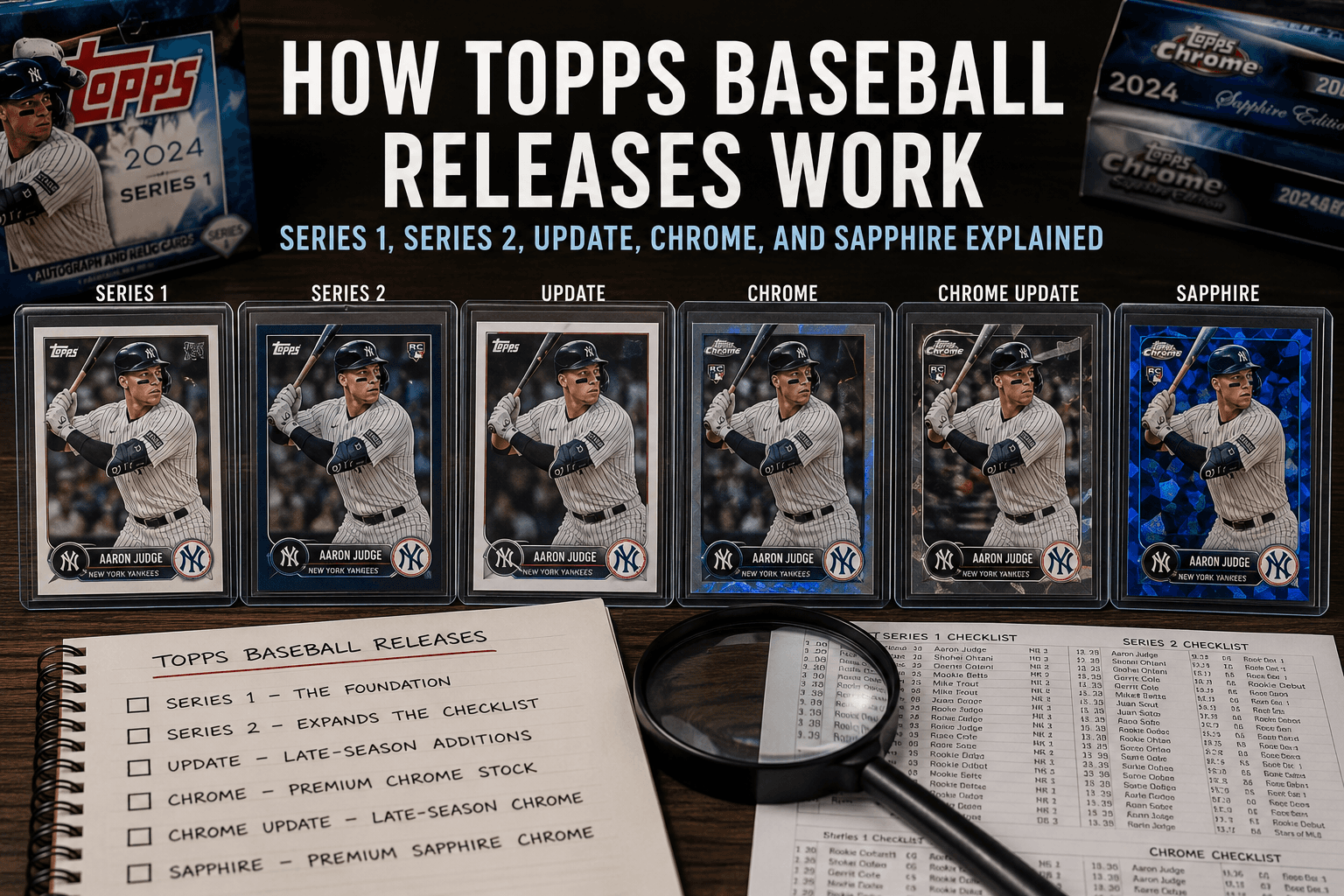
You see Series 1, Series 2, Update, Chrome, Chrome Update, and Sapphire products released under the Topps name. Many feature the same stars and rookies. Some use similar photographs or design ideas. Others appear to continue checklists that began earlier in the season.
That can make it tempting to treat them as different versions of the same product.
They are not.
Each release has its own role, checklist, card numbers, parallels, inserts, configurations, and collector expectations. Series 1 and Series 2 form the traditional flagship structure. Update adds later-season players and storylines. Chrome creates a separate chromium-card experience. Chrome Update applies that treatment to late-season content. Sapphire adds another premium visual treatment to a related checklist.
Understanding that structure makes it much easier to identify cards correctly.
It also supports the way CardWiki approaches card identity. Manufacturer, brand, product family, product year, release extension, treatment, checklist, card number, parallel, and configuration should remain separate factors instead of collapsing into one long product title.
What Is Topps Flagship Baseball?
Topps flagship baseball is the main annual Topps baseball product line.
When sports card collectors refer to flagship, they are usually talking about the traditional paper-style release built around Series 1, Series 2, and Update.
Flagship products typically establish the main design language for the year. They introduce large base checklists and may include rookies, stars, team cards, league leaders, inserts, parallels, autographs, memorabilia cards, and image variations.
The flagship structure generally includes:
- Topps Series 1
- Topps Series 2
- Topps Update
These releases are connected, but each has a separate checklist and product identity.
A collector building the complete flagship year may pursue all three. Someone collecting one player may find different cards of that player across each release.
What Is Topps Series 1?
Topps Series 1 is the first major flagship release of the baseball season.
It introduces the year’s primary Topps design and begins the annual flagship checklist. It usually includes a broad mix of established stars, veterans, team cards, league leaders, and rookies available when the checklist is created.
Series 1 commonly serves as:
- The First Flagship Checklist
- The Introduction To The Year’s Design
- An Early Source Of Rookie Cards
- The Beginning Of The Annual Set-Building Chase
- A Foundation For Inserts And Parallels
Series 1 is important, but it is not intended to include every player who will matter during the season.
Checklist production begins well before every roster move, debut, injury, and breakout performance is known. That is one reason later releases exist.
What Is Topps Series 2?
Topps Series 2 is the second major installment of the annual flagship set.
It continues the product family with a new checklist of players and card numbers. The design generally follows the same flagship style established by Series 1, but the cards belong to a separate release.
Series 2 may add:
- Players Not Included In Series 1
- Additional Rookies
- More Veterans And Stars
- New Inserts
- New Parallels
- Additional Short Prints Or Variations
Collectors sometimes assume Series 2 is simply more Series 1 packs.
That description is too loose.
Series 2 continues the flagship year, but it has its own checklist, product configurations, odds, exclusive content, and card identities.
A Series 1 card and Series 2 card should therefore be cataloged under different release extensions even when they share the same annual design.
Topps Series 1 Vs Series 2
The simplest distinction is timing and checklist placement.
- Series 1 Opens The Flagship Product Year
- Series 2 Continues The Flagship Product Year
- Each Release Uses A Different Base Checklist
- Each Can Include Its Own Inserts And Parallels
- Both Usually Share The Year’s Flagship Design Language
One series is not automatically better than the other.
Collector demand often depends on the players, rookies, short prints, inserts, and parallels included in that specific checklist.
A strong rookie class can make one release more popular. A desirable image variation or rare insert can make a card from either series important.
The release name alone does not determine value.
What Is Topps Update?
Topps Update is the later flagship release that closes out the annual paper-style product cycle.
It exists partly because baseball changes after Series 1 and Series 2 are planned. Players change teams. Prospects are called up. Rookies debut. All-Star events happen. New season storylines emerge.
Update gives Topps another opportunity to reflect those developments.
The checklist may include:
- Traded Players In New Uniforms
- Later Rookie Additions
- Rookie Debut Cards
- All-Star Content
- Season Highlights
- New Inserts
- Update-Specific Parallels
Update is not simply a corrected version of Series 1 or Series 2.
It is its own release with a separate checklist and card-number structure.
Topps Series 1 Vs Series 2 Vs Update
Collectors can think of the flagship cycle as three connected chapters.
- Series 1 Begins The Annual Flagship Checklist
- Series 2 Expands The Checklist
- Update Captures Later Developments
All three may share the broader Topps flagship identity, but they should remain distinct in a catalog.
For example, one player could have:
- A Series 1 Base Card
- A Series 2 Insert
- An Update Rookie Debut Card
- A Parallel From Each Release
- A Photo Variation In One Release
Those cards may be related through the same annual flagship family, but they are not duplicates.
What Is Topps Chrome Baseball?
Topps Chrome Baseball is a separate release built around chromium-style card stock, reflective finishes, refractor technology, color parallels, inserts, and autograph content.
Chrome may share visual ideas, players, or relationships with flagship baseball, but it should not be treated as a shiny version of the same physical card.
A Topps flagship card and a Topps Chrome card can differ in:
- Product Checklist
- Card Number
- Card Stock
- Surface Treatment
- Parallel Structure
- Insert Structure
- Autograph Content
- Product Configuration
The Chrome release has its own identity.
This is especially important when cataloging rookies. A flagship rookie and Chrome rookie of the same player may both be desirable, but they are separate cards from separate releases.
Topps Chrome Vs Topps Flagship Baseball
The clearest difference is product treatment and release identity.
Topps flagship baseball generally uses traditional paper-style card construction and the annual Series 1, Series 2, and Update structure.
Topps Chrome uses chromium card technology and a refractor-heavy parallel system.
A simplified comparison looks like this:
- Flagship Uses Traditional Card Stock
- Chrome Uses Chromium-Style Stock
- Flagship Includes Series 1, Series 2, And Update
- Chrome Has Its Own Checklist
- Chrome Is Known For Refractors And Color Parallels
- Both Can Include Rookies, Inserts, Autographs, And Rare Cards
Chrome is not automatically rarer or more valuable than flagship.
The specific player, card, parallel, condition, print run, and collector demand still matter.
What Is Topps Chrome Update?
Topps Chrome Update combines the late-season Update concept with the Chrome treatment.
It is generally designed around players and storylines associated with the later part of the season, presented through chromium-style cards and refractor parallels.
Chrome Update may feature:
- Rookie Call-Ups
- Rookie Debut Content
- Traded Players
- All-Star Moments
- Chrome Inserts
- Refractor Parallels
- Autographs
- Numbered Versions
Chrome Update is not the same as paper Topps Update.
It is also not the same as the main Topps Chrome release.
The identity needs at least two important factors:
- Extension Type: Update
- Treatment Or Product Line: Chrome
That separation is essential for accurate card matching.
Topps Chrome Vs Topps Update
Topps Chrome and Topps Update are fundamentally different products.
Topps Chrome is a chromium-style release with its own checklist and parallel system.
Topps Update is the final paper flagship installment of the year.
The simple distinction is:
- Topps Chrome Is A Chromium Product
- Topps Update Is A Paper Flagship Extension
- Chrome Focuses Heavily On Refractors And Shine
- Update Focuses On Later-Season Checklist Additions
- Both Have Their Own Card Numbers And Checklists
A collector should never identify a card as simply “Topps Update Chrome” without confirming whether it belongs to Topps Update, Topps Chrome Update, or Chrome Update Sapphire.
The exact product name matters.
What Is Topps Sapphire?
Topps Sapphire is a premium visual treatment known for a bright blue, crystalline, or gem-like Chrome appearance.
Sapphire products are typically connected to an existing Topps or Chrome checklist, but the Sapphire treatment creates a distinct release with its own parallels, scarcity, packaging, and collector identity.
Topps describes Chrome Sapphire Baseball as transforming a related Chrome checklist through premium Sapphire Chrome stock and Sapphire-specific parallel designs.[1]
Sapphire releases may include:
- Sapphire Chrome Finish
- Sapphire-Exclusive Parallels
- Lower-Volume Product Positioning
- Premium Box Configurations
- Autographs
- Numbered Color Versions
- Distinct Sapphire Checklist Records
A Sapphire card should not be cataloged as an ordinary Chrome base card.
The treatment is part of the identity.
Topps Chrome Vs Topps Sapphire
Chrome and Sapphire are visually related, but they are not interchangeable.
Chrome is the broader chromium-style product.
Sapphire is a distinct premium treatment or companion release.
The differences may include:
- Sapphire-Specific Card Finish
- Separate Release Packaging
- Different Product Availability
- Different Parallel Structure
- Different Box Guarantees
- Different Scarcity
- Separate Checklist Documentation
A Chrome card and its Sapphire counterpart may feature the same player, card number, and core design. They are still different cards.
This is exactly why a catalog cannot identify cards using player, year, and number alone.
Treatment matters.
What Is Topps Chrome Update Sapphire?
Topps Chrome Update Sapphire applies the Sapphire treatment to the Chrome Update product structure.
This creates another distinct layer.
The hierarchy can be understood like this:
- Topps Flagship
- Topps Update
- Topps Chrome
- Topps Chrome Update
- Topps Chrome Sapphire
- Topps Chrome Update Sapphire
These products may be connected through brand, season, checklist relationships, or visual design, but each needs its own release identity.
Chrome Update Sapphire is therefore not merely “Sapphire” and not merely “Update.”
It combines both extension and treatment factors.
Why The Same Player Appears In So Many Topps Products
A star or rookie may appear in several Topps releases during one year.
That does not mean Topps is issuing the same card repeatedly.
Each release serves a different collecting goal.
A player might have:
- A Series 1 Base Card
- A Series 2 Insert
- An Update Rookie Debut
- A Chrome Base Card
- A Chrome Refractor
- A Chrome Update Card
- A Sapphire Card
- A Sapphire Parallel
Collectors may chase all of them or focus on one product family.
The key is recognizing each as a distinct catalog record.
How Parallels Work Across Topps Releases
Each Topps release can have its own parallel structure.
Series 1 parallels may differ from Series 2 parallels. Update may introduce additional versions. Chrome typically has a deeper refractor rainbow. Sapphire may have its own exclusive color treatments.
Parallel factors can include:
- Color
- Foil
- Pattern
- Finish
- Serial Number
- Retail Exclusivity
- Hobby Exclusivity
- Sapphire Treatment
A Gold parallel in flagship is not automatically related to a Gold Refractor in Chrome or a Gold Sapphire parallel.
Color names can repeat across product families while representing different cards.
Why Checklists Matter
A checklist is one of the best tools for determining which Topps release a card belongs to.
It helps confirm:
- Product Name
- Player
- Card Number
- Insert Name
- Parallel Availability
- Variation Status
- Autograph Checklist
- Release Extension
Never assume a card belongs to Series 1, Series 2, Update, or Chrome based only on the front design.
Check the card number and compare it to the correct product checklist.
How To Identify A Topps Baseball Release
Use a repeatable process when identifying Topps cards.
- Check The Copyright Year
- Look For The Product Name
- Find The Card Number
- Identify The Card Stock
- Look For Chrome Or Sapphire Finishes
- Check For Series Or Update Codes
- Compare The Card Against The Checklist
- Identify Any Parallel
- Check For Serial Numbering
- Confirm The Exact Release In A Catalog
The card back is often especially useful because it may include product codes, card numbers, copyright information, and release clues.
Common Beginner Mistakes
Topps baseball products become easier to understand once you avoid a few common mistakes.
These include:
- Treating Series 1 And Series 2 As One Checklist
- Assuming Update Is A Reprint
- Confusing Topps Update With Chrome Update
- Treating Chrome As A Flagship Parallel
- Treating Sapphire As A Normal Chrome Base Card
- Ignoring Card Numbers
- Assuming Identical Players Mean Identical Cards
- Mixing Product Configuration With Card Identity
- Failing To Check The Correct Checklist
The biggest mistake is using a vague product name when a precise one is available.
“Topps baseball card” is not enough.
How CardWiki Models Topps Releases
CardWiki is built to separate the factors that define a trading card.
For a Topps baseball card, those factors may include:
- Manufacturer: Topps
- Brand: Topps
- Product Family: Flagship Or Chrome
- Product Year
- Release Extension: Series 1, Series 2, Or Update
- Treatment: Paper, Chrome, Or Sapphire
- Checklist
- Card Number
- Player
- Parallel
- Variation
- Serial Number
- Autograph Or Memorabilia Status
- Configuration Evidence
This structure prevents related cards from being merged incorrectly.
It also helps collectors understand how every card connects to the broader product family.
Final Thoughts
Topps baseball releases work as a connected product ecosystem.
Series 1 begins the flagship year. Series 2 expands it. Update adds later-season players and moments. Chrome creates a separate chromium-card release. Chrome Update applies that style to late-season content. Sapphire transforms related checklists with a distinct premium treatment.
These products are related, but they are not the same.
Understanding the differences helps collectors identify cards correctly, compare appropriate versions, follow checklists, and organize collections with greater confidence.
That is exactly what CardWiki’s identity-first catalog is designed to support.
Trying to identify which Topps release your card belongs to? CardWiki helps collectors explore structured set records, compare Series 1, Series 2, Update, Chrome, and Sapphire cards, and track exact versions with confidence.
FAQs
What Is Topps Flagship Baseball?
Topps flagship baseball is the main annual paper-style product family built around Series 1, Series 2, and Update.
What Is The Difference Between Topps Series 1 And Series 2?
Series 1 begins the annual flagship checklist, while Series 2 continues it with a separate group of players and card numbers.
What Is Topps Update?
Topps Update is the later flagship release that commonly includes traded players, rookie debuts, late rookies, All-Star content, and season developments.
Is Topps Chrome The Same As Topps Series 1?
No. Topps Chrome is a separate chromium-card release with its own checklist, refractors, inserts, autographs, and configurations.
What Is The Difference Between Topps Chrome And Topps Update?
Topps Chrome is a chromium-style product, while Topps Update is the final paper flagship extension of the year.
What Is Topps Chrome Update?
Topps Chrome Update combines late-season Update-style content with Chrome card stock, refractors, parallels, and autographs.
What Is Topps Sapphire?
Topps Sapphire is a premium Chrome-style treatment known for its blue crystalline appearance, exclusive parallels, and separate product identity.
Is A Sapphire Card The Same As A Chrome Card?
No. Sapphire may use a related Chrome checklist or design, but the Sapphire treatment creates a separate card version and release.
Why Does CardWiki Separate Every Topps Release?
Separating product family, release extension, treatment, checklist, and card version creates a more accurate catalog and prevents different cards from being merged.
[1] Official Topps product descriptions characterize Chrome Sapphire as a premium Sapphire Chrome treatment applied to a related Chrome checklist.